
Greetings and welcome to another edition of the Rich on Tech newsletter. This week, your newsletter was compiled in Maui, where I attended the Snapdragon Summit.

We also hit a new milestone this week: 75,000 subscribers! Thanks for being a part of this. It’s been a really fun journey growing this direct line from my brain to your inbox.
Maui, and Hawaii in general, is one of my favorite places in the world. I’ve now been here twice for work without my family in tow, and it’s a completely different experience. On the plus side, my dinners were cheaper and I could work more. On the downside, the Aloha spirit makes it tough to stay focused on a computer screen when you can see and hear the ocean crashing below.
Somehow, I made it through.
What I saw at Snapdragon Summit
Full disclosure: Qualcomm, the company behind Snapdragon, provided my travel to this year’s event but had no editorial oversight over my coverage.
This was my first time attending Snapdragon Summit, which has been held in Hawaii for nearly the past decade. They actually held the first one in New York City before moving it to Hawaii the following year.
If you’re not familiar with Snapdragon, these are the chips that power many of the world’s most popular Android phones, including devices from Samsung, Motorola, OnePlus, Honor and others. Apple and Google make their own main processors, although Apple still uses some Qualcomm technology.
If you remember “Intel Inside” back in the day, think of Snapdragon in a similar way. It’s the technology inside your phone powering much of the experience.
Watch the video below for my overview of the conference.
Here are some of the interesting things I saw:
Microsoft Surface Mouse with Haptics - This is a mouse that lets you “feel” what you see on screen. Think of the little vibrations you feel on your phone when you type, tap something or play a game. Now imagine that feedback coming through your mouse when you click, drag, scroll and more. It launches October 13 for about $80.
Googlebook - This is Google’s latest entry into the laptop market. Google makes the software and provides the guidance, while manufacturers including Acer, Asus, Dell, HP and Lenovo make the actual computers. It combines Android technology with the desktop foundations of ChromeOS, so you get a full desktop browser plus millions of Android apps.
That also means things we take for granted on phones and tablets, like actually downloading Netflix shows for offline viewing, can finally work on a laptop. Yay!
There’s also a feature called Magic Pointer. Instead of digging through menus or right-clicking, you just jiggle the mouse cursor over something and the computer uses Gemini smarts to figure out what you might want to do with it.
Another killer feature is Rambler, which takes your natural speech and turns it into clean, organized text, even adding things like headers and checklists. It’s basically some of the best voice-to-text I’ve used. Apps like Wispr Flow can give you similar functionality across your computer, but those typically come with a subscription.
Snap SPECS - I tried on Snap’s $2,200 augmented reality glasses. The neat part is that they’re self-contained and let you interact with digital apps, games and information overlaid on the real world around you. The problem? They’re chunky, expensive and still need more polish before the average person is going to want to wear them around. But you can see where this is headed.

Moto Signature 27 - This is one of the first smartphones to use Qualcomm’s new generation of flagship Snapdragon chips, and I have high hopes for it. Motorola has great software, this looks like high-end hardware and the design is sweet. The camera includes a 200-megapixel periscope telephoto lens, but camera quality is still the biggest wild card for me. I’m looking forward to testing it.
Musings on Muse
This week, I discovered the magic of Meta’s Muse. Think AI chatbot, but personalized with your information and geared toward keeping you up to date on what’s happening in your life and even being proactive about it.
You can connect it to things like your email, calendar, notes and other apps and services. I don’t quite trust it enough with my email yet, so I’ve been hesitant to connect that.

But from what I’ve seen and done with Muse, it’s really solid. One of my favorite aspects is that instead of interacting with a faceless, nameless chatbot, you can actually see an animated representation of it at the top of the chat and give it a name. I also love the interaction format. It feels less like prompting a chatbot and more like texting an assistant.
And while it’s not perfect, it has continually impressed me, especially when you send it out onto the internet to accomplish a task. Or at least attempt to.
Each Muse gets the equivalent of its own little computer in the cloud, complete with a web browser, so it can browse websites, fill out forms and get things done on your behalf. When it needs a login or payment information, it can ask you for it, but Meta says Muse itself can’t see your passwords or payment details. Those are handled separately and stored securely.
I’m not the only one enthralled by this. Muse has topped Apple’s App Store charts and there’s been plenty of chatter about it in the tech world. Amazon has already blocked Muse from shopping on its website, which I think is a mistake.
If you want to try it, download Muse and use my referral code HQNMZE for extra tokens, which basically means you can use it more before hitting a limit.
But I also have it on good word that ChatGPT is preparing something very similar, so if you’re already invested in that ecosystem, you might want to wait a bit before connecting all your stuff somewhere else.
And how appropriate: as I write this, my little guy, named Merlin, just texted me about something. :)
Beats 360 can go from the gym to the office
I’ve been testing the new $350 Beats 360 headphones, and they have a neat trick: they can go from sweaty gym headphones to the office just by swapping out the cushions.
I’m not typically one to work out with over-ear headphones, but I know a lot of people like them. So I took the Beats 360 on a few runs and bike rides, did some strength training with them and also wore them on a flight.
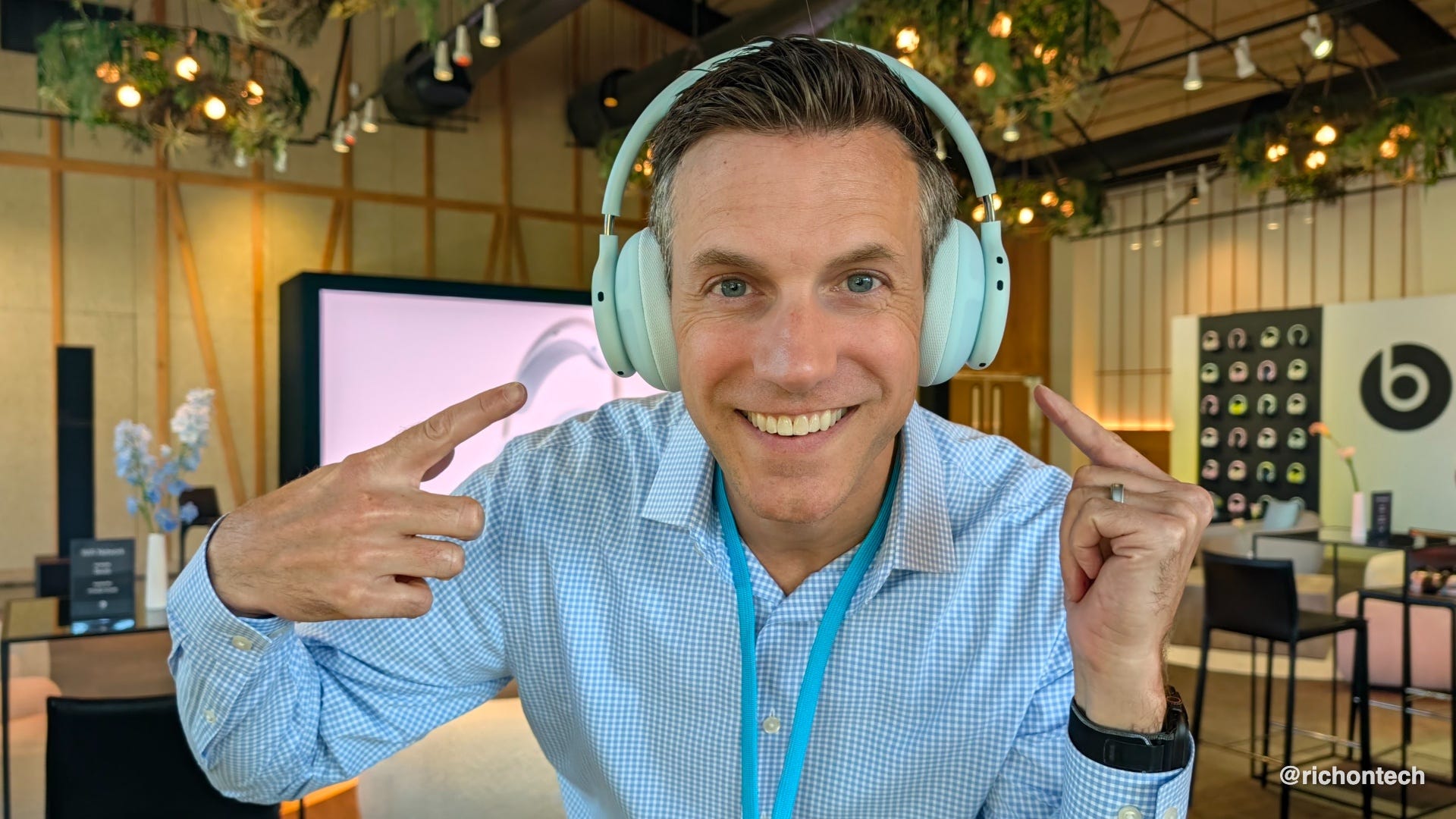
The sound is excellent and they’re super comfortable. There’s good noise cancellation too, although in my experience it’s not quite as good as what you’ll get from dedicated travel headphones from Bose or Sony. They’re also IPX4 sweat and water resistant, which is important if you’re going to exercise in them.
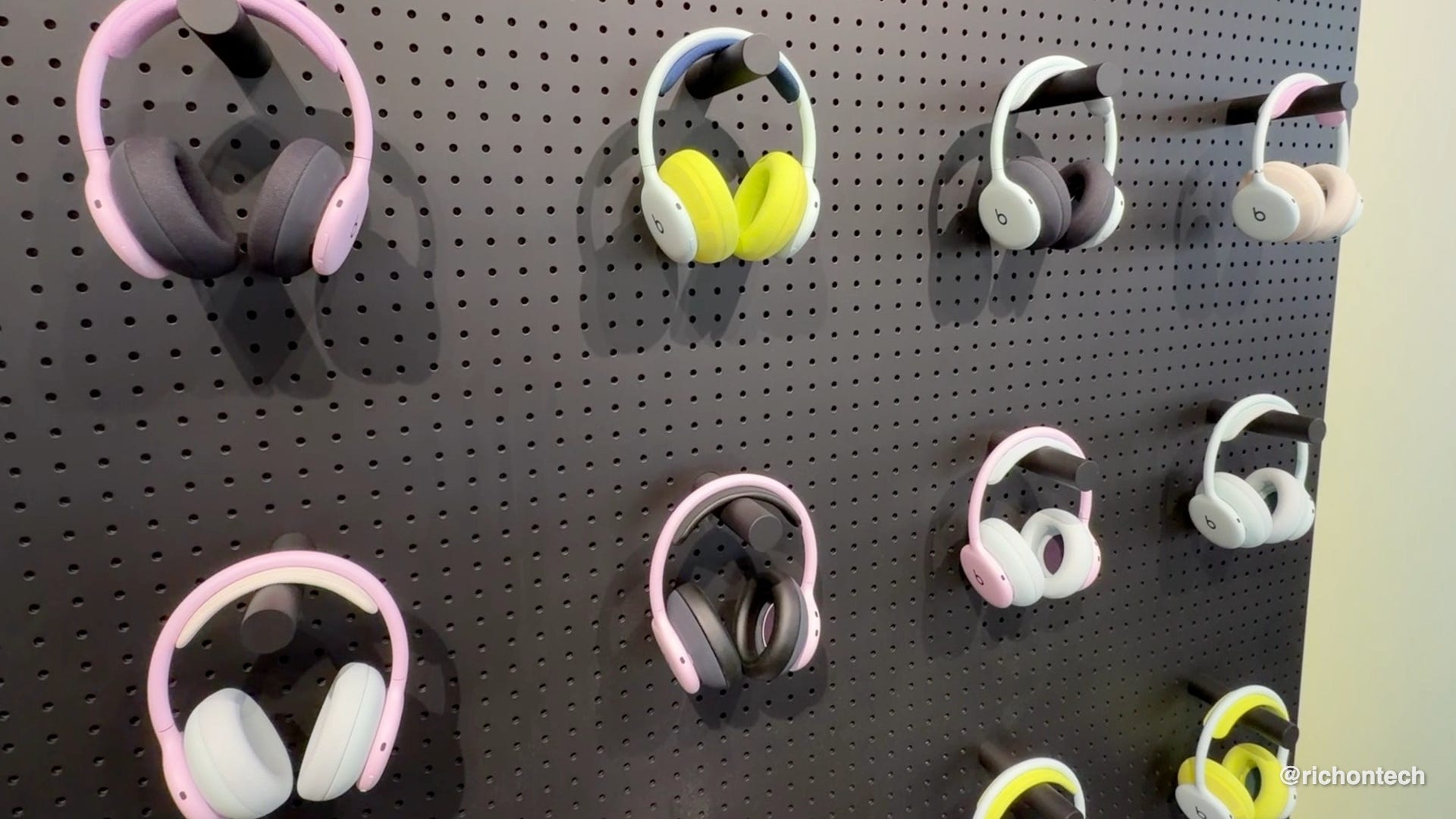
But the interchangeable cushions are what make these interesting. They come with breathable cushions designed for workouts, but you can swap in softer plush cushions when you’re done. You can also mix and match colors, so you could have bright, fun cushions for workouts and something more traditional for work.
It’s a clever concept because it lets one pair of headphones do double duty without feeling kind of gross after a sweaty workout. Extra cushion kits normally cost $50, but right now they’re just $10 through October 31.
Overall, I’m digging them. If you already like wearing over-ear headphones for workouts, I think these are a good buy because you can easily use them everywhere else too.
But if your priority is a great pair of travel headphones that you might occasionally work out in, I’d probably go with a more dedicated pair of travel headphones or earbuds.
They can’t scam you if they can’t find you
Sponsored by Incogni
Scammers can’t target you if they can’t find you. Your personal information can fuel all kinds of scams. Those fake IRS calls, phishing texts, “bank account alert” emails and insurance scams all start the same way. Data broker sites quietly collect your information and profit by selling or sharing it with others.
Incogni has now completed 794 removal requests to have my personal information taken down, with 814 total requests sent and another 160 scheduled. My dashboard says it has saved me nearly 596 hours of doing this work myself.
Incogni works behind the scenes to remove your data and keep checking for it when it pops back up. Its automated service covers 420+ data brokers, with recurring removals so you don’t have to keep filing requests yourself.
Want even more protection? The Unlimited plan adds custom removals from 3,000+ additional sites and lets you submit unlimited custom removal requests.
Take back your privacy today!
🔗 Get my spam-busting deal for 60% off with code RICHONTECH
Tech Tidbits
Disney+ and Hulu price hikes - Just like clockwork, Disney+ and Hulu are raising prices again. The standalone ad-free version of either service is now $21.49 a month, up from $18.99. Interestingly, the ad-free Disney+/Hulu bundle is just $21.99. Streaming can still be a good value if you’re actually watching, but all those subscriptions add up. Look for bundles, check for perks from companies you already do business with, and cancel what you’re not using. If you’re paying full price for every streaming service separately, you’re probably doing it wrong.
Best-rated TVs, computers and appliances - I’ve always loved lists, especially when products and services are ranked. The latest American Customer Satisfaction Index finds that products are generally getting better, but customer service remains a pain point. Shark ranks highest for vacuum cleaners. Hisense, Samsung and Vizio tie for the top spot in TVs. Apple and Samsung tie for personal computers. And Haier, which includes GE, Haier and Hotpoint, takes the top spot for major appliances.
Adobe Premiere for Android - Nearly a year after launching on iPhone, Adobe Premiere is finally on Android. There are already plenty of mobile video editors, including Edits and CapCut, but Premiere is free, powerful and has no ads or watermarks. One feature I especially like is seeing audio waveforms right on the timeline, which makes editing much easier. My big question is captions. CapCut is still my gold standard there, and Adobe says enhanced captions are coming soon to Android. I’ll be testing it.
F-Droid 2.0 - One of the neat things about Android is that you can install apps from outside Google Play. I don’t recommend doing this unless you trust the source and know what you’re doing, since sideloading can carry security risks. But for more advanced users, F-Droid is worth checking out. It’s an alternative app store focused entirely on free and open-source software. F-Droid itself doesn’t track you, and version 2.0 has a fresh redesign that makes finding and installing apps easier. Great if you’re looking for simple, open-source alternatives to popular apps.
Travel gotcha
At our resort in Maui, they had automated towel machines by the pool. You scan your room key, a door opens and you can grab the towels you need.
There’s also a warning: return your towels by midnight or you’ll get hit with a $25 charge. The sign says the towels have trackers in them, but I’ll admit I thought there was a little theatrics involved. Did every single towel really have an RFID tag inside that somehow knew whether I returned it?
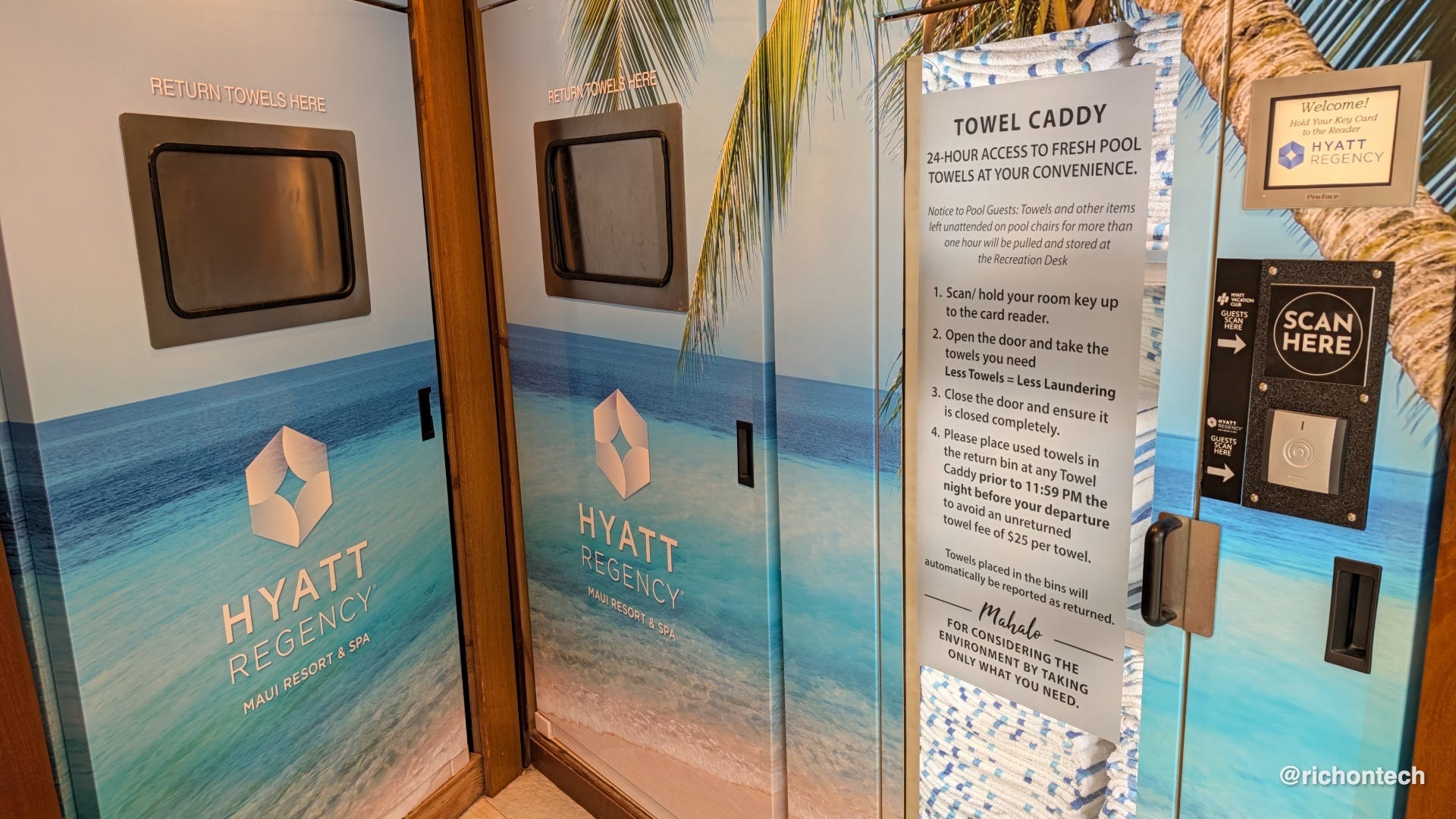
Well, I found out the hard way.
I left a towel in my hotel room instead of putting it back in the return slot. Sure enough, when I checked out, there was a $25 towel charge on my bill.
Since I hadn’t actually taken the towel home, I went to the front desk and asked if they could remove the charge. They happily did. I also asked how the system worked, and they confirmed that each towel has a tiny radio-frequency identification, or RFID, tag embedded inside. When you drop the towel into the return bin, it gets checked back in, basically like a library book.
The front desk told me they remove multiple towel charges from guests’ bills every day, so apparently I’m not the only one who didn’t realize that simply leaving the towel in the room could trigger the fee.
Anyway, I thought it was an interesting use of technology. And yes, it definitely works.
Travel lesson: when the pool towel machine tells you it’s keeping track, believe it.
What I bookmarked this week
I haven’t necessarily fully tested or endorsed these, but they caught my attention enough to bookmark for later. Some are things I might download, try or just keep handy for future reference. Have fun checking them out, and let me know if anything deserves a closer look!
Tunelapse - Creates a personalized mix of music and podcasts designed to fit the length of your commute.
AsFound - Helps you document the condition of a rental car when you pick it up and return it, giving you a record in case there’s a damage dispute. It also works for hotels, rental properties and other situations where you might want proof of an item’s condition.
Batch - A Chrome extension for managing your Google Photos library in batches. Copy edits across photos, add descriptions, change dates and times, and more.
GSB - A daily browser game where you try to rank four companies by annual revenue.
Q&A: The store app is broken. How can I still access my rewards barcode?
Jim writes: My wife is having trouble with the Raley’s app on her Android phone. It works fine on our desktop, but the phone app keeps giving us a “technical error.”
I’ve tried force stopping it, clearing the cache, and even uninstalling and reinstalling it. We called Raley’s, but they said it must be the phone. I found other people online reporting the same problem.
She needs the barcode in the app to get her discounts at checkout. Any advice?
A: Since you’ve already tried the usual troubleshooting steps, I’d check for any app updates. If other people are reporting the same issue, there’s a good chance the problem is with the app and not her phone.
In the meantime, here’s a handy workaround: you can turn the rewards barcode into a pass in your phone’s digital wallet.
First, pull up the barcode on the Raley’s website and take a screenshot.
On Android, open Google Wallet, tap the + button and choose Everything else. Select the screenshot and follow the steps to create a pass.
On iPhone, open the Wallet app, tap the + button and look for the option to create a pass from a barcode or QR code, then follow the directions.
Once it’s saved, you can simply pull up your wallet at checkout and scan the pass without opening the Raley’s app.
One caveat: this works best with a barcode that stays the same. If a store uses a barcode that changes regularly for security, a saved pass or screenshot might not work.
Feedbag
A few notes from viewers and listeners this week:
Mark wrote that he considers himself a “pretty marginal tech user” but said the newsletter helps keep him informed.
Marilyn wrote, “I truly appreciate your tips on TV and here,” and thanked me for the “constant wonderful info and help.”
Kevin wrote, “As always love your show and podcast,” before revealing that he’s still using an Apple SuperDrive to burn CDs and listen to music. Physical media lives!
Tom tried Mindtrip after hearing about it on the show and came away with a warning: his flight booking included nonrefundable fees even though he selected a refundable fare. He said he’d be cautious recommending it to anyone who isn’t a savvy traveler.
Brian sent a handy AirPods reminder: on supported models, you can press the stem during a call to mute and unmute the microphone. You can even change the gesture from one press to two in Settings.
Garrett wrote after hearing me talk about my late friend Bryan on the radio and called it “one of the most human reactions I have ever heard on radio.” A lot of you sent kind notes like this. They mean a lot to me. I wasn’t expecting to break down on the radio, but it happened and I’m fine with that.
That’s going to do it for this week. The best thing you can do is forward this newsletter to a friend who could use a little more tech knowledge. And I couldn’t resist, one more picture of Maui before I go.

Be sure to listen to my radio show Saturday at 11 a.m. PT on KFI AM 640, catch the replay Sunday night at 8 p.m. ET on 710 WOR in New York, or subscribe to the podcast and listen anytime.
Rich