
Welcome to another edition of the Rich on Tech newsletter. It’s been a whirlwind of a week.

Last time I wrote, I was in Maui. From there, I flew home to L.A., met up with my wife and kids at the airport, and we all hopped on a red-eye to New Jersey to surprise my mom for her milestone birthday. We pulled it off and it was fantastic.
Once we got home, I turned around and headed to Las Vegas to host a panel.
And we had another birthday to celebrate. My little one turned 12, which is wild.
That means it’s been 12 years since I got a parking ticket for leaving my car outside my own home because we had to rush to the hospital so fast. That one stuck with me and he is well worth the ticket.
I finally get AI agents
Over the past two weeks, I’ve gotten completely invested in AI agents. It’s pretty unbelievable how quickly I went from thinking this was a pie-in-the-sky idea to relying on them for all kinds of things.
It started with Meta’s Muse, which I think is incredible. This is a personal AI agent that not only has access to the information and services you connect to it, but also has access to its own virtual computer and browser. That means instead of just answering questions, it can actually go off and do things on your behalf.
I think that’s a very big shift in how we use AI.
Not to be outdone, ChatGPT came out with its version called Dots, and I’ve been playing with that, too. It literally placed the pizza order for my kid’s birthday party.
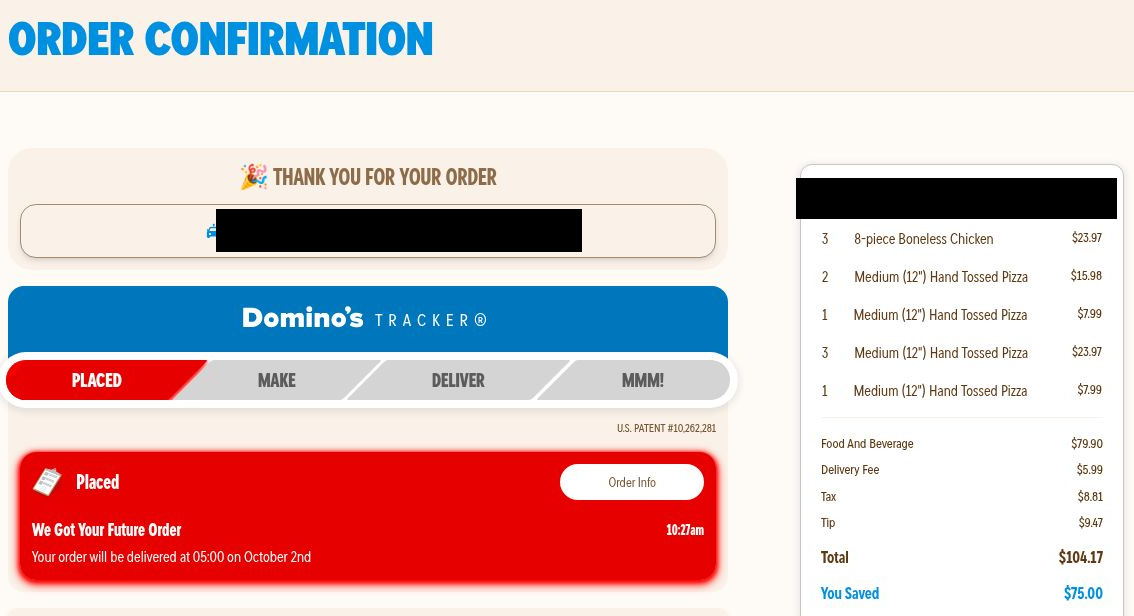
Here’s the best part: I’ve been poo-pooing that exact example for the past two years. Tech companies kept telling us that someday AI would be able to order dinner or handle errands for us, and I always thought, “Do I really need that?”
Now I get it.
I told Dots how many kids and adults were coming to the party, what kind of pizza we wanted and asked it to find the best deal. It figured out what to order, put everything in the cart and told me when it was ready. I checked the order, entered my payment information, and boom, pizza scheduled for delivery.
I’ve also spent a lot of time thinking about Muse versus Dots. Right now, there’s one huge difference: Dots requires a ChatGPT Pro plan, which starts at $100 a month. Muse has a free tier, although there are usage limits.
For most people, that makes Muse the easier place to start. I also think it feels a bit more like a dedicated personal assistant right now. Dots has an advantage in how it works with the ChatGPT tools and plugins I already use, but the experience can be a little more confusing. I sometimes find myself wondering whether I should ask ChatGPT or ask Dots.
My guess is that ChatGPT will eventually bring Dots to less expensive plans to get more people using it, but that’s just my prediction.
Here’s just a sampling of what I’ve had these AI agents help with over the past week:
Watch things for me: specific emails, prices, flights, Instagram DMs
Clean up storage: find duplicates, free up space, rename files and reorganize folders
Handle email: search messages, triage my inbox and draft replies
Manage my calendar: add events and set reminders
Research: compare products and prices, research travel options and fact-check things
Organize things: save articles, create Notion pages
Travel logistics: find bookings, check in for flights and look for restaurant availability
The beauty of these agents is that everyone will use them differently. There isn’t going to be one killer feature because the killer feature is whatever saves you time.
The challenge is that none of them comes with an instruction manual. You have to think of things for them to do.
At first, you’re going to hit roadblocks. You’ll ask for something they can’t do, or it’ll get stuck halfway through a task. That can be frustrating. But then you’ll ask it to do something you never expected it could handle, and it works.
My advice right now is to start with Meta’s Muse and experiment. There’s a free tier, so you can get a feel for what an AI agent can actually do before deciding whether you need more.
Once you’re in, look for Connectors. That’s where you can link services like your email, calendar, Instagram and other apps you use. The more useful context you give an agent, the more it can potentially do for you.
There is a privacy trade-off here, and it’s worth thinking about before connecting everything. Also pay attention to permissions. These agents can take actions on your behalf, and Muse is designed to ask for approval before certain things like sending messages or making purchases. I’d be thoughtful about which permissions you give it and how much autonomy you’re comfortable with.
How to stop random apps from tracking you
This week on TV, I shared a simple way to see which apps are tracking your location.
Think about how many apps you’ve downloaded where you quickly tapped “Allow” just so you could get through the setup. Then you probably never thought about that permission again.
Take a few minutes to do a location privacy audit on your phone. You might be surprised by how many apps have access and how easy it is to clean things up.
They can’t scam you if they can’t find you
Sponsored by Incogni
Incogni just added a new feature I really like: a Privacy Score. Think of it like a credit score for how exposed your personal information is online.
My score is 84 out of 100, which Incogni rates as “strongly protected.” Even more interesting: it estimates my score would be just 38 without Incogni. The average Incogni user is at 70.
But the number is only part of it. The dashboard also shows what’s affecting my score. That matters because personal information floating around online can make it easier for scammers to target you with phishing messages, robocalls, fake account alerts and other scams.
Incogni works behind the scenes to remove your data from brokers and keeps checking for it when it pops back up. My dashboard says it has saved me nearly 596 hours of doing this work myself.
Want even more protection? The Unlimited plan adds custom removals from thousands of additional sites and lets you submit links where you find your information exposed.
Take back your privacy today!
🔗 Get my spam-busting deal for 60% off with code RICHONTECH
Incogni says its Privacy Score is an estimate based on information including account history, removals and known exposures, and does not guarantee complete privacy.
New gadgets that caught my eye this week
So many new products were announced this week. I’m not going to run through every spec, but there are a handful of new gadgets and features that I think are actually interesting.
Amazon finally acknowledges we like buttons
Amazon completely redesigned its Kindle lineup, including the regular Kindle, Kindle Paperwhite and Kindle Colorsoft. They’re thinner, some are lighter, and the new design has a flat front without the recessed screen of older models.
Amazon moved the power button. On the Kindle I previously tested, it was on the bottom, right where I would accidentally press it while reading. Now it’s on the upper-right side. Thank you, Amazon.
The other big addition is the Kindle Click, Amazon’s first Bluetooth page-turn remote. Prop your Kindle up on a tray table, nightstand or stand and you can turn pages without reaching for the screen. Amazon says it works with compatible Kindles from 2024 and newer.

Amazon also introduced a magnetic cover with actual page-turn buttons built into it. This feels like an admission that some of us still really like physical buttons. It’s one of the reasons I continue to use an older Kindle.
The catch? The cover costs about $80. I cannot recommend spending $80 on a cover just to get page-turn buttons, but I’m glad Amazon is at least acknowledging that buttons are good. Now how about putting them back on the Kindle itself?
Samsung Galaxy SmartTag3
The $30 Galaxy SmartTag3 is smaller and lighter, gets up to 550 days of battery life under normal use and, most importantly, now works across Android and iPhone.
Samsung says more than 900 million participating Galaxy devices around the world can help locate a lost tag through the Galaxy Find Network.
The feature I find most interesting is called Movement Detection Alert.
Instead of only using a SmartTag to find something after it goes missing, the tag can alert you when it detects movement. Put one on something that normally stays put and you can know when it moves.
My one complaint is the design. Samsung got rid of the large integrated loop that made the previous SmartTag so easy to attach directly to a key ring. If you want that functionality now, you’ll need an accessory.
Twelve South AirFly Drive
If your car has wired CarPlay but not wireless CarPlay, Twelve South has a simple $40 fix.
The new AirFly Drive plugs into your car’s CarPlay USB port and turns that wired connection into a wireless one. It works with both Apple CarPlay and Android Auto.
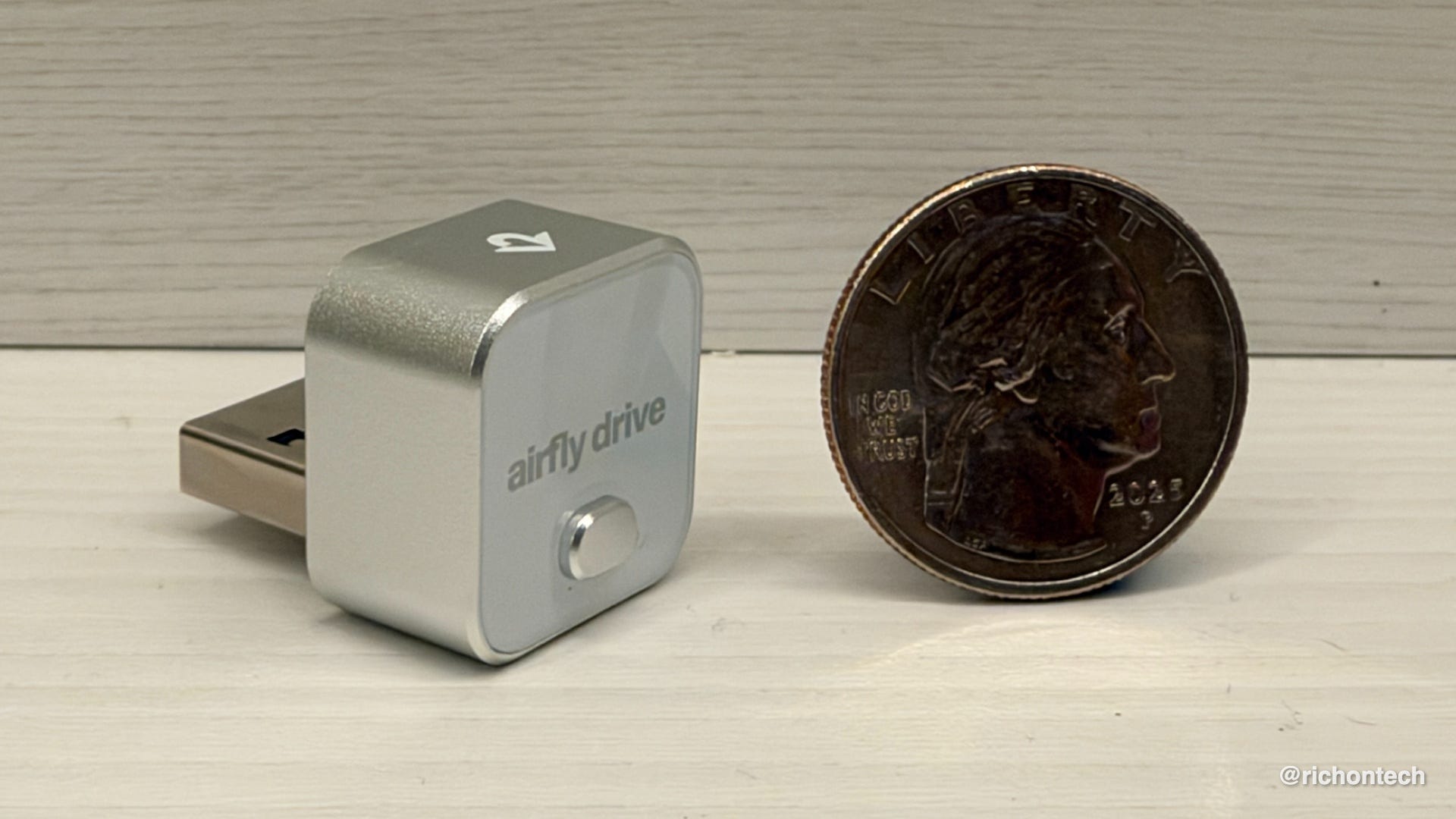
I immediately thought of my wife’s car, which has wired CarPlay but not wireless. Installation and setup was a breeze. This is the best implementation of this sort of gadget yet.
There is one trade-off: I typically like to plug in my phone in the car anyway because I want to charge it. If you’re doing that, wireless CarPlay isn’t quite as useful. But if you have wireless charging or if you just want to get in the car and have CarPlay pop up without taking your phone out of your pocket, this is a really nice $40 upgrade.
A new Fire TV Stick 4K
Amazon also introduced a new Fire TV Stick 4K, and this is probably the model I’d look at first if I were buying a Fire TV Stick today.
It’s $60 at regular price, although Amazon is already discounting it to $30 with code 4KINTRO. Amazon says apps launch 35% faster than before, and the stick supports 4K video, HDR10+ and Wi-Fi 6.
Amazon also redesigned the remote so it’s easier to tell which way you’re holding it without looking. The Home button has a distinct feel, and there’s now a customizable star button that you can assign to a favorite app or feature.
Tech Tidbits
Your car is sharing data with big tech: Consumer Reports found 19 of 21 connected cars tested communicated with third parties, including companies like Google, Meta and Amazon. Check the privacy settings in your car and its app and turn off any sharing you don’t need.
Galaxy S26 gets Android 17: Samsung is rolling out One UI 9, based on Android 17, to the Galaxy S26 lineup. It brings a refreshed look along with new customization, privacy and other features.
200+ scary movies for free: Pluto TV added more than 200 horror movies for Halloween, including titles from Scream and Friday the 13th. There are ads, but everything on Pluto TV is free.
Free international data from Opera: Opera’s Android browser now includes a travel eSIM offering eligible users 3 GB of international data free for three days in more than 45 destinations. No credit card required.
What I bookmarked this week
I haven’t necessarily fully tested or endorsed these, but they caught my attention enough to bookmark for later. Some are things I might download, try or just keep handy for future reference. Have fun checking them out, and let me know if anything deserves a closer look!
OptOutPrescreen: Tired of all those preapproved credit card and insurance offers showing up in your mailbox? OptOutPrescreen.com lets you remove yourself from the lists. I’ve done this before, and it really cuts down on the junk mail. Hat tip to Jared Newman for the reminder.
America.gov: This new official government website puts an AI-style interface on information from thousands of federal, state and local government websites. Ask how to replace a Social Security card, get a passport or navigate a government program, and it gives you an answer with links to official sources.
T-Mobile Project 10Million: Emma sent this one in. Eligible K-12 students can get a free Wi-Fi hotspot with 200 GB of high-speed data per year for five years.
BrickOS: A fun retro launcher for Android that can make your home screen look and work like an old-school iPod, Zune or Windows Phone.
Q&A - Which 5G Home Internet?
Dave in Henderson, Nevada asks:
Which is better for home internet: Verizon 5G Home Ultimate or T-Mobile All-In Home Internet? We’ll be using it for two TVs, a computer and our phones.
The best service is whichever one has the strongest signal at your house. Even if Verizon or T-Mobile works great on your phone around town, the experience can be very different inside your home.
Here’s my advice: invite some friends over, one with Verizon and one with T-Mobile, and run speed tests on their phones near the windows where you might put the home internet gateway. Compare both download and upload speeds, and I’d start with whichever network performs better.
If you already have cellular service with one of the carriers, that could tip the scales since you may qualify for a bundle discount.
Most importantly, don’t cancel your existing internet right away. Get the new service set up and use it normally for at least a week. Stream TV, work on your computer and connect all your usual devices. 5G speeds can vary depending on the time of day and network congestion, so make sure you’re happy with the performance before making the switch.
Feedbag
A few notes from viewers and listeners this week:
Liz in Half Moon Bay watched my location privacy segment on KRON and thanked me for sharing “practical and useful tips.”
Noel spotted a cool new feature in the United app after I introduced him to Flighty. Under My Trips, United now shows your past trips organized by year, although the history only goes back to 2025. I checked it out and immediately wished it went back further.
One listener told me they’re using Muse to compare Medicare Plan G options for next year and called the experience “pretty cool.” Brilliant.
And Kate in Oceanside wrote that she appreciates that I explain tech “in a manner that the non techie can understand.” She’s still using a 7th-generation iPad and is hoping Prime Day might finally be the excuse she needs to upgrade. Fingers crossed.
One More Thing
One more thing before I go. I mentioned I was in Las Vegas this week. I was there for ITC, an insurance technology conference where, as you might expect, a lot of the conversation was about AI and how it could make things like insurance claims faster and easier.
I was there to host a panel with Jonathan Scott of the Property Brothers. He was great to talk with, really knows his tech and made my job on stage pretty easy.

Jonathan is an investor in Phyn, a smart water company I’ve covered before. Its products monitor your home’s water usage and can detect leaks before they become expensive problems. The new DIY Phyn Assist installs on your washing machine water line and monitors for leaks and unusual water usage. Pretty sure I need one.
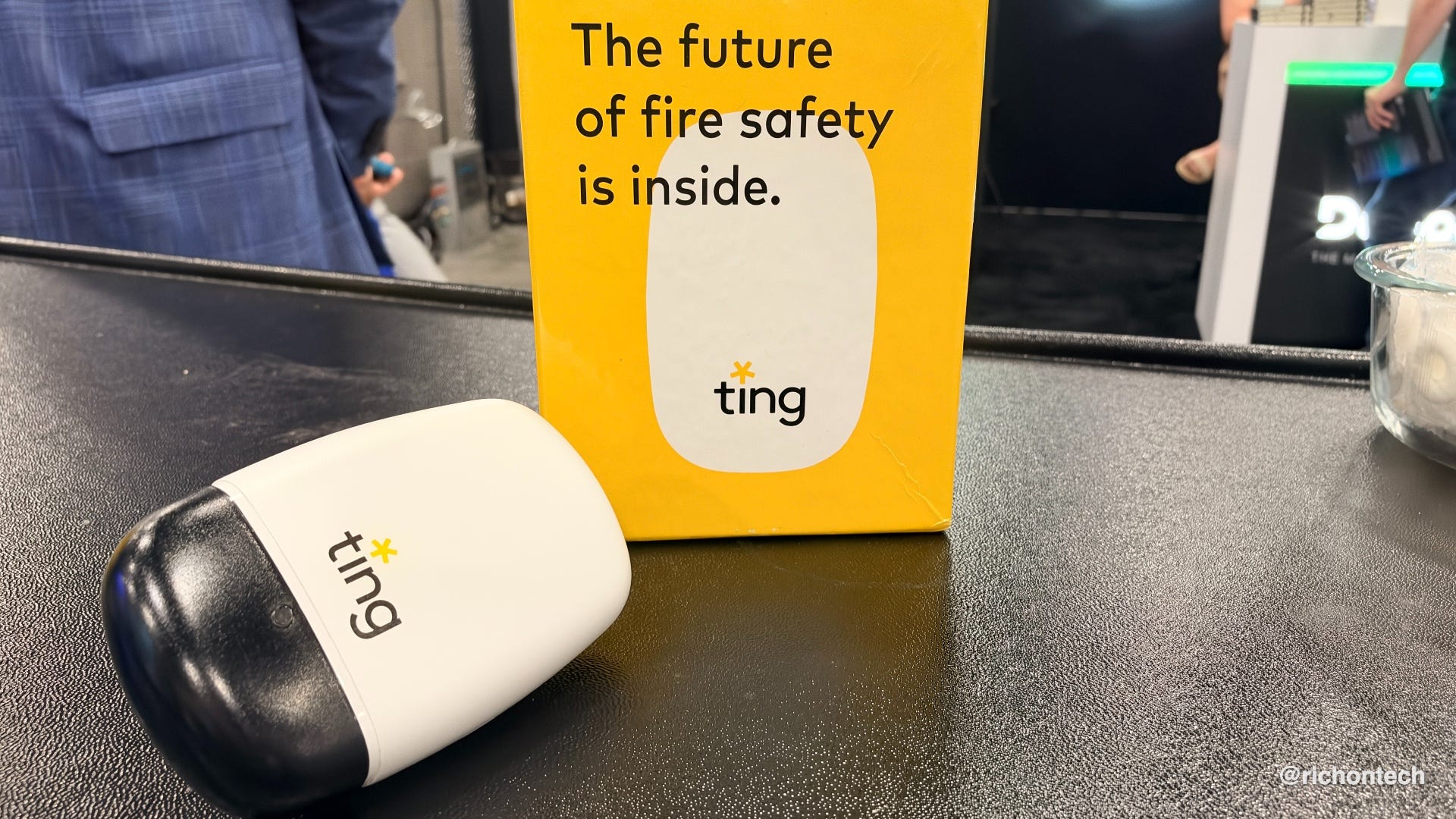
Ting takes a similar approach with electricity. Plug the sensor into an outlet and it monitors your home’s electrical system for dangerous arcing and other potential fire hazards. Its network can also help determine whether a power or internet outage is just at your house or affecting the neighborhood.
Both are smart-home technologies designed to catch potentially expensive problems early.
That’s going to do it for this week. The best thing you can do is forward this newsletter to a friend who could use a little more tech knowledge.
Be sure to listen to my radio show Saturday at 11 a.m. PT on KFI AM 640, catch the replay Sunday night at 8 p.m. ET on 710 WOR in New York, or subscribe to the podcast and listen anytime.
Rich