
Greetings and welcome to another edition of the Rich On Tech Newsletter! I’ve been enjoying some time off with my family and it’s been nice to reset a bit.

Big milestone this week. We passed 80,000 subscribers! It’s a nice reminder that the information, tips and little discoveries I share here are valuable to you. Thanks for reading and being part of this.
Black Friday and Cyber Monday are here, and this is one of the best times of the year to find big discounts. Prices are generally higher this year, and people are feeling the pinch. I think retailers will do what they can to get shoppers to spend, even if the deals aren’t quite as good as we’ve seen in years past. There will still be sales after Cyber Monday, but I believe some of the deepest discounts are happening right now.
In the spirit of the shopping season, I’ve got a deal of my own. Become a Rich On Tech VIP for just $25 for your first year, 50% off the regular $50 price.
As a VIP, you’ll get priority status in my inbox, instant access to the full archive of past newsletters and the highest-quality audio version of my podcast, with no additional ads inserted.
It’s a great way to support the work I do, and I appreciate it!
A simple trick to clean up your inbox this Black Friday
Before we get into my holiday shopping tips, here’s a tip to save your inbox: Use the unsubscribe link!
Every company you’ve ever done business with is probably going to email you some sort of offer this week. Use this opportunity to unsubscribe from promotional emails you no longer need or want.
I have a filter set up in Gmail that automatically labels any email containing the word “unsubscribe” with a bright red UNSUBSCRIBE ELIGIBLE label. It’s a visual reminder that the message is part of a mailing list and there’s probably a link to get off it. Use it!
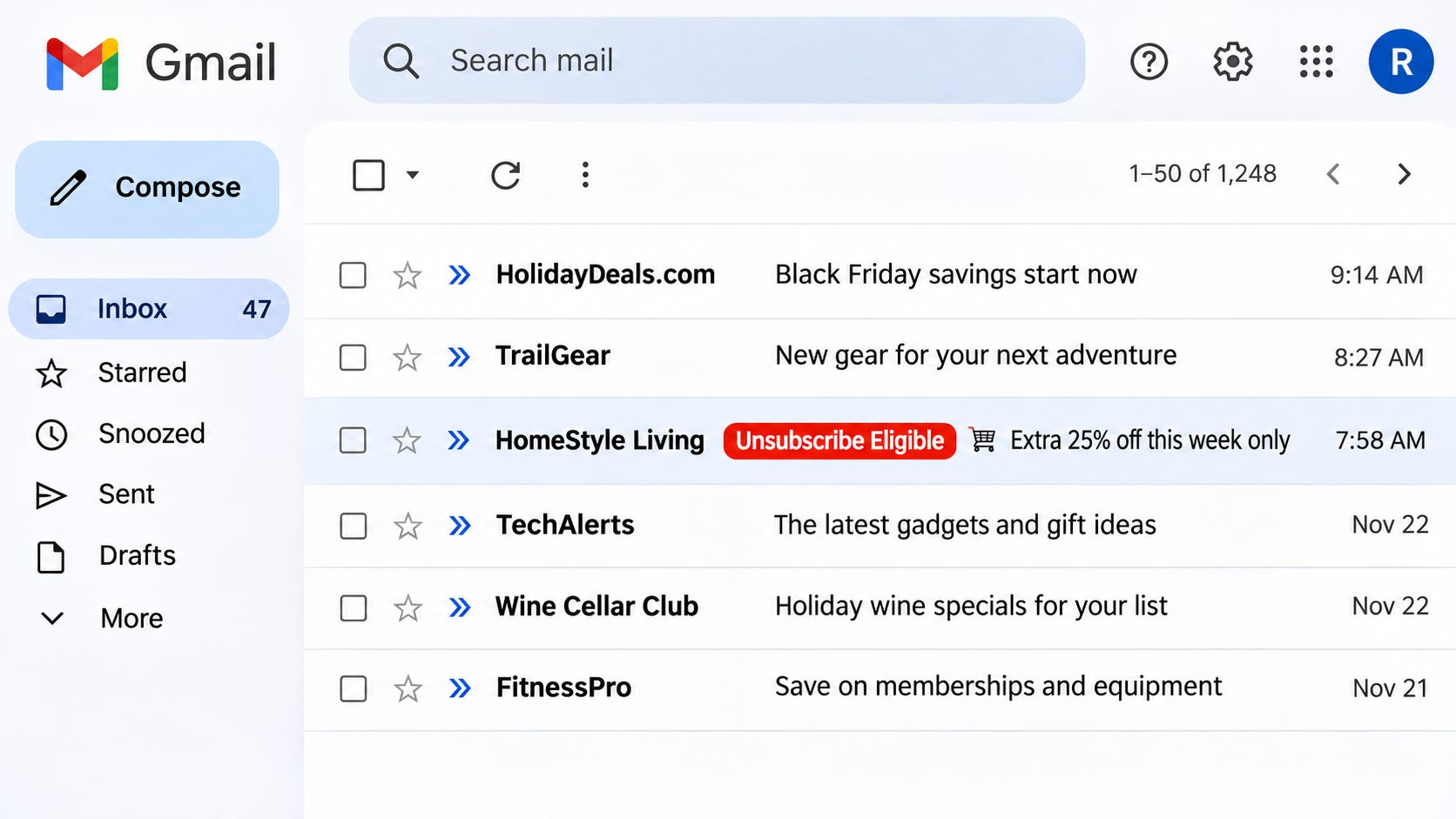
Just remember my rules of thumb for reducing unwanted emails. If the message is from a legitimate business or a recognized mailing list service like Mailchimp or Constant Contact, it’s generally safe to unsubscribe. But if it’s from an unknown sender or looks suspicious, don’t click anything. Just delete it or report it as spam.
Two more tips: Consider turning off automatic image loading in your email app. Some senders use tiny, invisible tracking images to find out when you’ve opened a message. Disabling automatic image loading can help protect your privacy, although it won’t stop every type of email tracking.
And start using email aliases! These are disposable email addresses you can give to websites and retailers instead of your real address. Messages still arrive in your regular inbox, but if a company starts sending too much junk, you can just turn off that alias. Apple’s iCloud+ includes Hide My Email at no extra charge, as does newsletter sponsor StartMail with its paid service. Alias.email and SimpleLogin also offer free plans.
My favorite tools for smarter holiday shopping
Now, on to my tips for shopping this holiday season!
First off, don’t trust those percentage-off numbers! They’re typically based on the full retail price, and let’s be real, how often does anything actually sell for full price? Throughout the year, prices go up and down, so that big 50% off sticker doesn’t necessarily mean you’re getting a great deal. You need to do a little research.
Check the price history. On Amazon, you can use Alexa for Shopping to see what something has sold for in the past. On mobile, look for the Price History link near the price. You can see 30 days, 90 days or even a full year of pricing. You can also set alerts for price drops or have Alexa automatically buy something when it hits your target price.
On desktop, look for Alexa for Shopping near the top of Amazon’s website. My favorite question to ask: “What’s the lowest price this product has been in the past year?” That gives you a much better idea of whether today’s sale price is actually a bargain.
Two other websites worth knowing about are Keepa and CamelCamelCamel. Keepa adds detailed price-history graphs right into Amazon product pages as you browse, while CamelCamelCamel lets you paste in an Amazon product link to see what it has sold for over time. For Walmart, a newer tool called CamelMart aims to offer similar price tracking.
Save $5 by texting Alexa. Amazon recently introduced the ability to shop by sending Alexa a text message. There’s also a promotion offering $5 off your first eligible purchase made this way. The terms describe it as a limited-time offer without specifying an expiration date.
Find deals other shoppers have discovered. My first stop is almost always Slickdeals. It’s a crowdsourced website where people post deals they’ve found online, and the community evaluates and votes on them. The best deals tend to rise to the top. I also like DealNews, which uses editors to find and vet deals. And Wirecutter does a nice job rounding up discounts on products its team has tested and recommends.
Activate your credit card offers. Your credit card might have money-saving offers built right in, but you typically have to activate them one by one. Check your Chase, American Express, Citi or other credit card accounts to see whether there are discounts or statement credits for things you’re already planning to buy.
You can also use paid services like CardPointers or Savewise to help automatically activate eligible offers. Savewise can also automatically activate all digital grocery store coupons for free.
Don’t forget about cash back. I like ShopBack, which has a wide selection of major retailers, along with longtime cash-back favorite Rakuten. For gas, groceries and some restaurant purchases, check out Upside.
The trick with these services is to check the offers before you shop and activate them properly. Referral bonuses can sometimes boost your savings, too.
Always look for a promo code. My go-to website is SimplyCodes. I don’t know how they do it, but their codes are well-sourced and up to date. Chances are, if I can’t find a working code there, I’m probably not going to find one elsewhere.
Speaking of codes, WowPriced is a newer discovery for me. It tracks Amazon deals, including coupon codes that aren’t always listed on the product page itself. I tested one of its codes on a random item and watched the price drop from around $40 to just $10. Not bad!
Search those old-fashioned store flyers. When I was a kid, I delivered newspapers. Before I’d hop on my bike and toss the paper into someone’s driveway, I had to collate a bunch of sale flyers and roll them up with the newsprint.
These days, those flyers have largely gone digital, and my favorite app for browsing them is Flipp.
Here’s the best part: You can actually search across all those flyers. Let’s say you need Gillette razors. Just type that into Flipp, and it’ll show you which nearby stores are advertising deals. It’s a great way to compare local prices without visiting a bunch of different websites.
Buy discounted gift cards. Here’s a trick for when a store isn’t offering a sale. Buy a discounted gift card and use it to pay for your purchase!
I’ve purchased several gift cards through CardCash, and the experience has always been good. You can also check CardBear, which compares offers from different gift card resellers to help you find the biggest discount.
One caution: I haven’t personally tested all the third-party resellers listed on CardBear. Check the terms, protections and any restrictions before buying. And don’t buy a discounted gift card until you’re pretty sure you’ll use it.
Protect your payment information. My rule of thumb is that if your physical card is going to leave your hand, use credit rather than debit. Credit cards generally offer stronger protections if something goes wrong, without putting the cash in your checking account at immediate risk.
When I’m paying in person, I prefer tap to pay with my debit card. It’s secure, helps me stick to my budget and means fewer surprise credit card bills at the end of the month.
For online shopping, check whether your card issuer offers virtual or one-time card numbers. These help keep your actual card number out of a retailer’s system.
I also really like Privacy.com, which lets you create virtual card numbers for online purchases. You can set spending limits or create a card that only works once. That’s especially handy for free trials. A single-use card won’t authorize a second transaction, although you should still cancel the trial properly to avoid owing money.
Get rid of Amazon’s sponsored results. One browser extension I like is Amazon Unsponsor. When you search Amazon on a desktop computer, it hides sponsored listings so you can focus on the regular search results rather than the products companies have paid to promote.
Use AI as your personal shopping research assistant. I’ve been using AI more and more when I shop. Not necessarily to make the purchase, but to compare products, find alternatives, research features and identify well-reviewed items.
And I’m not alone. According to OpenAI, retail and e-commerce conversations now account for more than 1.7 billion prompts on ChatGPT every week, based on September 2026 data. That’s a lot of shopping research!
If you’re using an AI agent that supports scheduled monitoring, you can even ask it to keep an eye on a product and notify you when there’s a promotion or price drop. Some agents can also do more involved research across retailers.
I came across this prompt on X that takes things a step further. It’s designed for an AI agent with access to your email and the ability to monitor deals on a schedule:
Review my email from the past 6 months to identify brands I’ve purchased from and my shopping preferences.
Every hour through Cyber Monday, monitor these brands for Black Friday/Cyber Monday sales. Cross-reference Rakuten cash back, credit card offers, promo codes, and other stackable discounts to find the best effective prices.
Alert me when unusually good, relevant deals go live. Target 2–5 high-quality alerts per day, prioritizing significant savings over routine promotions. Include the deal, effective discount, bonus offers, and purchase link. Avoid duplicates and unnecessary noise.
You’ll need an AI agent with the appropriate connections and scheduled-task capabilities for this to work. I’d also review which emails and account information you’re giving it access to.
Watch out for deals that are too good to be true. I’m noticing a couple of problematic trends in online shopping.
The first is products advertised using AI-generated images and videos that make them look far better than they really are. Sometimes what arrives looks nothing like the ad, if anything arrives at all. These promotions often pop up on social media or YouTube, sometimes disguised as product reviews that are really just sales pitches.
The other trend is websites designed to look like independent product reviews but are actually elaborate advertisements. You know the kind: an incredibly long page that goes on and on about how amazing a product is, eventually leading you to a big button to buy it.
Sometimes a little digging reveals that the website is simply an advertisement, with the disclosure buried in tiny print. Other times, the links at the bottom of the page don’t work, the company information is vague or there’s no legitimate way to contact anyone.
Two tools can help you sort through this stuff.
Scamwise lets you paste in a suspicious message or link, or upload an image, and analyzes it for potential scam warning signs.
You can also use ChatGPT. Paste in a shopping website link or screenshot and ask: “Does this website, seller or offer have any warning signs?”
I do this all the time with questionable shopping websites people send me. AI can help identify suspicious claims, misleading prices, fake-looking reviews and other red flags you might miss. Neither tool is foolproof.
One more place to check for deals: your past Amazon purchases! Go to amazon.com/buyagain to see the stuff you’ve purchased in the past - it might be discounted right now!
I redesigned a website in under 10 minutes. I just watched.
Sponsored by Hostinger
I’ve built a lot of websites over the years. Recently I tried something that made me rethink the whole process.
It’s called Hostinger, and you build a site just by describing what you want.
I put it to the test. I pointed Hostinger’s AI at a family member’s small-business website and asked for a fresh design. It asked me a few quick questions, pulled in the photos and text from the original site, and went to work.
The fun part? I watched the AI build it right in front of me. Less than 10 minutes later, I had a completely redesigned site ready to publish.
Want a different layout, new colors or a punchier headline? Just ask, and the AI makes the change. No coding.
It’s more than a site builder, too. Your website, domain, business email and marketing tools all live in one place. That means fewer logins to juggle and more time for your actual business.
Selling candles on Etsy? Walking dogs on weekends? If you’ve been sitting on an idea for a side hustle, a small business or a personal project, this is your push to finally get it online.
Hostinger’s Black Friday deal is live now: plans start at $1.99 a month, and your domain is included. The deal ends December 14th. Try it risk-free for 30 days.
Go to Hostinger.com/Rich
Hostinger. Your whole business, under one roof.

20 of your favorite tech products from the past year
I took a look at the products you’ve clicked on most over the past year, and a few clear favorites emerged. These are some of the gadgets that have proven especially popular with you, along with my thoughts on why I like them.
I’ve also included some recent sale prices and historical lows to help you decide whether you’re getting a good deal.
Anker MagGo power bank for Apple Watch: My go-to all-in-one travel charging solution. It has a built-in charging cable and an Apple Watch charger, so that’s one less cable to pack! Previous lowest price: $50.
Aura digital picture frames: Still one of my favorite digital photo frames. You control which photos appear on the screen, and you can even send pictures directly to a friend or family member’s frame. Makes a great gift, especially for grandparents. Previous lowest price: $139.
Amazon Alexa Photo Frame: My new favorite digital photo frame. It’s a little easier to manage than Aura because you can install the Amazon Photos app on your phone and let AI automatically select your best photos to display. You can also share photos with friends and family. New low price: $115.
Belkin 10,000 mAh power bank: An easy, inexpensive way to keep your phone charged on the go. I always recommend having backup power, especially when traveling. Previous lowest price: $15.
Apple AirPods Pro 3: Apple’s best premium earbuds for iPhone users, with excellent sound quality, noise cancellation and seamless integration with Apple devices. Best price yet: $150.
Kodak Slide N Scan film and slide scanner: A simple way to turn old negatives and slides into digital photos without sending them away to a service. At $162, it’s close to the year’s lowest price of $151.
Twelve South AirFly Drive wireless CarPlay and Android Auto adapter: An easy way to turn your car’s existing wired CarPlay or Android Auto connection into a wireless one. No more plugging in your phone every time you get in the car. At $32, it’s at its lowest price of the year. Just make sure your car already supports wired CarPlay or Android Auto.
Amazon Echo Show 11: A big, beautiful smart display for listening to music, controlling smart home devices, asking Alexa questions and watching videos. At $155, it’s close to the year’s lowest price of $150.
Anker Nano 45W 10,000 mAh power bank: A portable way to charge your gadgets quickly. I love the built-in cable, additional USB connections and little display that shows battery level and charging speed. At $46, it’s close to the year’s lowest price of $40.
trtl travel pillow: The only travel pillow I’ll use. Seriously. It helps me sleep like a baby, even in the worst economy seat. It’s pricey at $48, but worth it to me, and it rarely drops to this price.
Philips rabbit ears indoor TV antenna: The best indoor TV antenna I’ve tested for the price. For about $15, you can pick up local broadcast channels, including news and sports, with no monthly fees. Reception depends on where you live.
Apple iPad: Still the gold standard for tablets. It’s easy to use, has an enormous selection of apps and works great for everything from streaming and reading to email and video calls. A solid choice for just about anyone.
Amazon Alexa Tablets: New for 2026, and a big improvement over the older Fire tablets I’ve rarely recommended. These have redesigned hardware, better build quality and full access to the Google Play Store, so you can install familiar Android apps. Go with the 8-inch for portability, the 12 Pro for the most premium experience or the 11-inch for a nice balance of features and price.
eero 6+ mesh Wi-Fi system: One of the easiest ways to improve Wi-Fi coverage throughout your home. Setup is simple, and adding multiple units can help eliminate those frustrating dead zones.
SUPERDANNY power strip surge protector: If you have as many gadgets as I do, you know there are never enough outlets. This gives you plenty of places to plug everything in without juggling a bunch of separate power strips.
WHOOSH! Screen Shine Duo: My favorite way to keep phones, tablets, laptops and other screens clean and fingerprint-free.
WYZE Cam OG indoor/outdoor security camera: One of the original names in inexpensive home security cameras. It’s affordable ($20), easy to set up and offers color night vision. A good way to keep an eye on your home without spending a fortune.
SYNCWIRE magnetic phone ring holder: A simple little accessory that makes it easier to hold your phone and prop it up to watch movies or TV shows, especially on a plane.
Cordbrick weighted cord holder: One of those little gadgets you don’t realize you need until you try it. It keeps charging cables from sliding off your desk and disappearing behind the furniture. A great stocking stuffer.
Spigen Ultra Hybrid clear case and screen protector: My go-to combination for protecting just about any smartphone. The Ultra Hybrid case is grippy, durable and lets you show off your phone’s color. Spigen’s screen protectors are also excellent and easy to install. They’re sold separately, but both are usually a fantastic value.
Finally, if you’re looking to save on streaming services, look no further than Cord Cutter Weekly’s Big List of Streaming Deals. If there’s a promotion or discount on a streaming service, chances are you’ll find it here. It’s one of the best resources I’ve found for keeping track of all the offers in one place.
I think that about does it! Have a fantastic Thanksgiving holiday with friends and family, and happy shopping!
If you enjoy this newsletter and find the information valuable, the best way to say thanks is to forward it to a friend or share it on social media. It’s a simple way to help others discover my work. Thanks for reading!
Rich